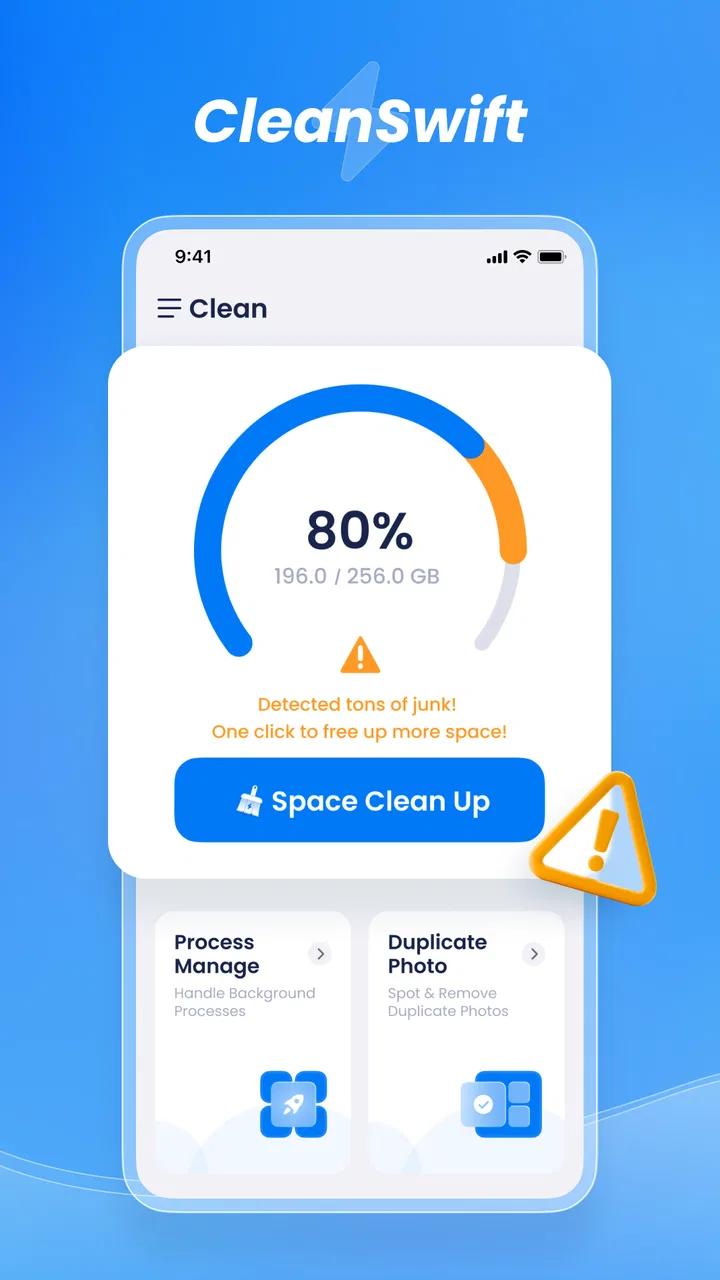
CleanSwift
- 4.2
- Rating
- 100.00K
- Installs
- Free
- Price

 Analysis by App-foxy
I usually approach cleaning apps with some caution. “Cleaner” tools often promise a faster phone, then make the process harder to understand than the clutter they are meant to remove. CleanSwift takes a more modest position as a cleaning tool assistant, and that makes it easier to judge: its value depends less on dramatic claims and more on whether it helps you identify unwanted files without turning routine maintenance into a chore.
After spending time with it, I see it as a practical option for Android users who want a dedicated place to review storage clutter. It is a free tools app from musicchamsmobile, available for devices running Android 6.0 or later. The current release is version 1.0.22, and its Everyone age rating makes it approachable for a broad range of users. I would not treat it as a magic performance booster, but I can see why it has attracted an average rating of 4.2 from around 500 ratings and more than 100K installs.
What I would check before choosing a cleaner
My first decision criterion is control. A useful cleaner should make it obvious what I am about to remove, separate disposable clutter from personal files, and give me a chance to stop before anything important disappears. That matters more than a flashy promise about making a phone “new.” Photos, downloaded documents, videos, and messaging attachments can all look like storage waste at a glance, but they may be exactly the files I want to keep.
You May Also Like

 Blood Strike: 2.5 Anniversary
Blood Strike’s Loadouts Turn Every Drop Into a Tactical Gamble
A close look at Blood Strike’s custom loadouts: how fast access to signature weapons reshapes its battle royale rhythm, rewards preparation, and narrows the gap between fights.

 Pandora - Music & Podcasts
Pandora’s Music Is Easy to Start, but Harder to Recover
Pandora’s strength is its low-effort path from a seed to a station. Its weak spot is how much confidence it asks you to place in connection, setup, and quiet recovery.

 8 Ball Pool
 Is Built on Rivalries, Rematches, and Routine
A close look at the rivalries, rematches, shared routines, and unanswered safety questions that turn a quick pool match into a persistent mobile community.

 Samsung Music
’s Quiet Strength Is Playing What You Already Own
Its reach comes less from spectacle than from dependable access to a personal library. That simplicity is both the app’s strongest retention engine and its ceiling.

 AccuWeather: Weather Radar
AccuWeather Review: A Quick, Clear Forecast for Everyday Decisions
For everyday plans, the best forecast is the one you can understand quickly. AccuWeather makes rain timing, radar, and local conditions easy to act on, with a few trade-offs.

 Hill Climb Racing
Why Hill Climb Racing Still Turns Crashes Into One More Run
A tiny car, a bumpy hill and one more upgrade: Hill Climb Racing keeps resurfacing because its simple chaos makes every near-miss feel personal.
More From Our News Desk
View All News


The second criterion is effort. If I have to open several menus, interpret technical labels, or repeat the same scan every day, the app becomes another maintenance task. CleanSwift is most appealing when I need a straightforward assistant rather than a full device-management suite. Its role is easy to understand, which is helpful for someone who simply wants to inspect a phone and decide what can go.
I also consider whether a cleaner solves a real problem on my device. If storage is comfortable and I already review downloads manually, installing another utility may add little. On the other hand, phones used for years tend to collect temporary material, duplicate downloads, forgotten installers, and large media files. In that situation, a focused cleaning app can save time even if it does not change the phone’s underlying hardware or system behavior.
One practical test I recommend is to open the app when the phone is not urgently full. That gives you time to read categories and understand its suggestions instead of approving everything under pressure. I would also review the largest items first. Removing one obsolete large video or an old installation file can be more useful than deleting dozens of tiny items, and it reduces the chance of making a risky decision just to gain a barely noticeable amount of space.
A realistic everyday check
Imagine a phone used for commuting, family chats, screenshots, and occasional work downloads. After several weeks, the Downloads folder may contain documents that were opened once, while chat applications may have accumulated images that were useful briefly but no longer matter. In that situation, I would use CleanSwift as a review station: scan, inspect the groups it presents, keep anything recognizable, and remove only the material I can identify as disposable.
The important habit is to treat the app as an assistant, not an automatic decision-maker. I would not run a broad cleanup while rushing to catch a train or while someone is waiting for a file. A few extra seconds spent checking names and previews is a sensible trade-off for protecting personal content. That workflow is one of the strongest reasons to use a dedicated cleaner instead of randomly deleting folders through a file manager.
Where CleanSwift feels most useful
The clearest strength is focus. CleanSwift is built around the simple idea of helping with phone cleaning, rather than asking the user to learn a large collection of unrelated tools. For a person who does not want storage charts, device diagnostics, or complicated optimization settings, that narrower purpose can feel less intimidating.
I also like the idea of using it as a periodic reset rather than a constant background companion. A monthly review is often enough for a lightly used phone, while a device that handles lots of media may need attention more often. This approach avoids the common mistake of treating every temporary file as an emergency. Storage maintenance works better when it is deliberate.
Another useful insight is that cleaning is not only about freeing space. It can improve my awareness of how I use the phone. If the same types of downloads keep returning, I may need to change where I save them or remove them after finishing a task. If screenshots dominate the review, a simple habit of deleting them after sharing may be more effective than relying on any cleaner. CleanSwift can reveal those patterns, even though the lasting solution is usually a change in routine.
For family members who are uncomfortable with Android’s storage settings, a dedicated tool may also be easier to explain. I would still supervise the first review, especially on a shared or older phone. Once the person understands which categories are safe to inspect and which files deserve caution, the process can become less confusing than navigating system menus alone.
The free price is another practical advantage. It means I can try the workflow without committing money before knowing whether it suits my phone. That is particularly useful in this category, where two apps can use similar language but feel very different in clarity and control. I would judge it by the quality of its review process, not simply by the fact that it costs nothing.
Small workflow improvements I would use
My preferred method is to begin with a scan, pause, and then handle one category at a time. I would avoid tapping a general cleanup action immediately. First I would look for familiar filenames, recent downloads, and media that may still be needed. This keeps the app in a supporting role and makes the result easier to trust.
I would also clean before a large download rather than after the phone is already full. That gives the device enough breathing room for the update, recording, or offline content I actually want. It is a less obvious use case, but it turns maintenance into preparation. The same idea applies before traveling, when maps, videos, and photos can quickly consume available space.
A third tip is to compare the app’s suggestions with the phone’s own storage view before approving a major cleanup. The system settings are often the better place to understand which applications or media groups consume the most room, while CleanSwift can be more convenient for a focused review. Using both views reduces blind spots and prevents me from assuming that the most visible category is automatically the biggest problem.
I would keep a final safety check for anything that looks personal, recently created, or difficult to replace. A cleaner should reduce clutter, not create a recovery project. If a file has an unclear name, I would leave it alone until I can open it or locate it through another tool. That extra caution is especially important with work documents, travel confirmations, school files, and family photos.
Where another option may fit better
CleanSwift is not automatically the best choice for every storage problem. If my main issue is a single oversized game or video application, Android’s own storage controls may be more direct. They can show which installed apps occupy space and let me manage those apps without adding a separate cleaning layer. In that case, a system tool may be the clearer route.
A file manager can also be preferable when I want precise folder-level control. Someone who regularly organizes documents, moves media to a computer, or works with external storage may find a file manager more flexible. It requires more attention, but that extra control is valuable when the task is organization rather than general cleanup.
Photo-focused users may be better served by the photo service they already use, particularly when their main challenge is finding unwanted screenshots, blurry images, or repeated pictures. A specialized photo workflow can make visual decisions easier than a broad cleaning assistant. I would choose CleanSwift when the clutter is spread across several kinds of files, not when my entire problem is an overflowing gallery.
There is also a group that should probably skip a cleaner altogether: users with plenty of free storage who rarely download files and already keep their phone organized. For them, the time spent reviewing suggestions may outweigh the benefit. Installing a tool simply because a phone feels slightly slower can also lead to the wrong diagnosis. Performance issues may come from an application, an operating-system problem, or aging hardware rather than removable clutter.
I am cautious about expecting any cleaner to improve battery life or transform responsiveness. Removing unnecessary files can help with storage pressure, but it does not change the phone’s processor, memory, or battery condition. CleanSwift makes more sense when the goal is reclaiming space and reducing digital mess. If the goal is a full performance diagnosis, I would look elsewhere or start with Android’s own troubleshooting tools.
The cost of changing from another method
Switching to CleanSwift is easiest for someone who currently cleans manually but wants a more guided review. The main adjustment is learning to trust the categories without surrendering judgment. I would keep my existing habits during the first few sessions, compare what the app highlights with what I already know about the phone, and gradually decide which suggestions are consistently useful.
Moving from another cleaner requires more caution. Different apps may group files differently, and a category that looks familiar may not represent the same kind of content. I would not install two cleaning tools and approve both sets of recommendations one after another. That creates unnecessary duplication and can make it harder to understand what was removed. Testing one workflow at a time is safer and gives a clearer impression of whether CleanSwift is actually helping.
The biggest switching cost is not money; it is attention. Any cleaning tool asks me to review decisions, and CleanSwift is no exception. If I want a completely automatic process, I may be disappointed because responsible cleanup should involve at least some checking. If I am willing to spend a short, focused session on storage, the trade-off is more reasonable.
I would also establish a personal rule before switching: never use a cleaner as the only copy of an important file. Documents and photos that matter should already exist somewhere appropriate, whether that means a computer, cloud storage, or another backup method. This is not a special requirement of CleanSwift; it is simply good practice whenever an app is helping decide what to delete.
How the app fits different Android users
For a casual Android owner, the appeal is simplicity. The app can serve as a reminder to inspect accumulated clutter without requiring technical knowledge. I would recommend it to someone who often sees low-storage warnings but does not know where to begin, provided they are prepared to review results rather than approve them blindly.
For a heavy media user, the value depends on how clearly the cleanup process exposes the files that matter most. Someone recording videos, saving offline content, or receiving many attachments should think in terms of large, replaceable files first. CleanSwift may help start that review, but I would still use the phone’s storage overview or a file manager when I need a detailed map of space usage.
For a technically confident user, the app is best viewed as a convenience layer. An experienced Android user can often reach storage controls directly and may prefer exact folder management. CleanSwift becomes worthwhile when its guided presentation saves time, not because it replaces every other maintenance tool.
The age rating of Everyone also makes it broadly approachable, but that should not be confused with making every cleanup decision risk-free. A younger or less experienced user may still need guidance around personal media, schoolwork, and shared-device folders. The interface may be accessible, while the consequences of deletion still deserve adult judgment in some households.
My recommendation after using it
CleanSwift is a sensible free choice if you want a focused cleaning assistant and your phone has accumulated enough clutter to justify a review. I like its straightforward purpose, its low barrier to trying it, and the fact that it can fit a calm, periodic maintenance routine. The current version, 1.0.22, also gives readers a clear release point to identify when comparing their installed copy with the app’s listing.
I would recommend it most strongly to people who need help finding disposable files across everyday phone use but do not want a complicated utility suite. Start with a non-urgent scan, inspect categories carefully, and use it alongside the phone’s own storage view. That combination offers convenience without giving up understanding.
I would not recommend installing it solely in the hope of fixing every slowdown, extending battery life, or replacing a proper backup system. Users who want precise folder control, application management, or photo-specific organization may find a system tool, file manager, or gallery solution better suited to the job.
My final view is that CleanSwift earns consideration because it stays close to a useful everyday problem: deciding what no longer belongs on a crowded Android phone. Use it as a careful assistant, not as a delete button. With that expectation, it is an approachable tool for periodic cleanup, while users with more specialized storage needs should choose the alternative that matches the type of clutter they actually have.
FAQs for CleanSwift
01What is CleanSwift and what does it offer?
CleanSwift is a powerful cleaning app designed for Android and iOS devices, offering a comprehensive suite of tools to optimize your device's performance. It helps clear cache, manage storage, and boost RAM, ensuring your device runs smoothly. The app also includes features like battery management and security enhancements.
02Is CleanSwift safe to use on my device?
Yes, CleanSwift is safe to use. It has been thoroughly tested to ensure it does not harm your device or compromise your data. The app follows strict privacy protocols to protect user information and does not require unnecessary permissions, ensuring a secure user experience.
03Does CleanSwift require a subscription or is it free to use?
CleanSwift offers both a free version and a premium subscription. The free version provides basic cleaning and optimization tools, while the premium version unlocks advanced features such as deep cleaning, enhanced security options, and ad-free usage. Users can choose according to their needs and preferences.
04How does CleanSwift improve battery life?
CleanSwift optimizes battery life by managing background processes and reducing battery-draining activities. The app identifies and halts unnecessary apps running in the background, adjusts device settings for maximum efficiency, and provides tips on prolonging battery health through better usage habits.
05Can CleanSwift help in managing storage space effectively?
Absolutely. CleanSwift offers efficient storage management by identifying large files, duplicate content, and unused apps. It provides easy-to-use tools to delete or compress files, freeing up valuable space. The app also suggests ways to organize data for better accessibility and storage utilization.
Pros
- Intuitive user interface for easy navigation.
- Customizable cleaning schedules for flexibility.
- Real-time performance monitoring.
- Supports multiple languages.
- Lightweight app with minimal battery usage.
Cons
- Limited features in the free version.
- Occasional ads in the free version.
- Requires internet for full functionality.
- No dark mode available.
- Customer support response can be slow.

CleanSwift
Gallery